
重構 Biomes 過程遇到的問題,涉及比較技術細節的故障排除所以額外發一篇文分開講。
原始錯誤
Exception occurred during build:
Traceback (most recent call last):
  File "impl/materializers.py", line 1783, in materialize
  File "impl/materializers.py", line 716, in materialize_ToIcon_Flora
  File "impl/vox.py", line 739, in iconify_voxel_array
  File "impl/render_voxels.py", line 111, in render_map
ModuleNotFoundError: No module named 'numpy.core.multiarray'

The above exception was the direct cause of the following exception:

Traceback (most recent call last):
  File "build.py", line 65, in exec_program
  File "impl/lru_cache_by_hash.py", line 30, in set_default
  File "impl/lru_cache_by_hash.py", line 24, in make_value_cached
  File "build.py", line 66, in <lambda>
  File "impl/materializers.py", line 1785, in materialize
impl.types.MaterializationError: Error materializing node: DerivedNode(kind='ToIcon_Flora', deps=[Flora:0x1fc2cb2e4002fa67], dep_hashes=['57036fed7713db64e4fb917e35d1c6cc5436883b'])
執行上下文
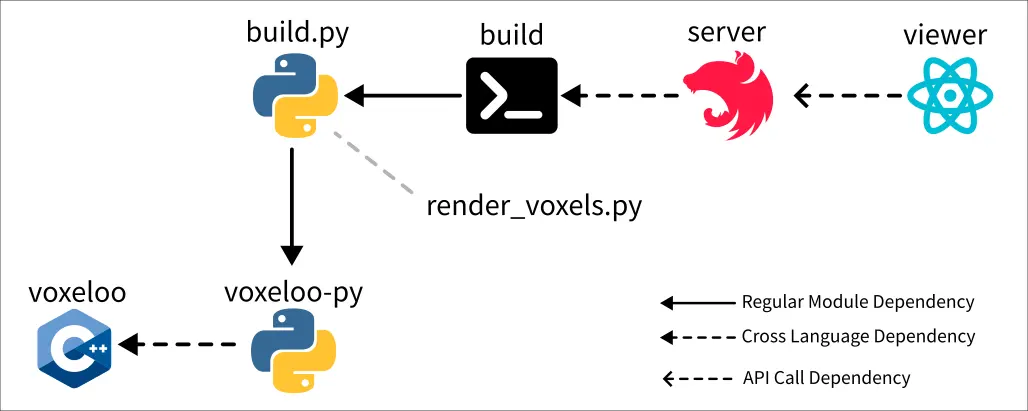
整個呼叫鏈是從 HTTP request 觸發,在 Nest.js 內部 spawn 一個副程式,
而該副程式是透過 pyinstaller 打包的 Python 程式,
並且該程式又 import 了另外一個透過 pybind11 打包的 C++ (實作的)動態函式庫。
出現問題的 render_voxels.py 則是「透過 pyinstaller 打包的 Python 程式」當中的一部分。
解決方法
在 build.py 所在的專案改變 numpy 的版本:
// pyproject.toml

-    "numpy>=1.26.0",
+    "numpy==1.26.4",
直後重新用 pyinstaller 打包一份新的執行檔。
推論過程
查資料的過程會發現常見的錯誤訊息跟我的有一點點不同,不是 numpy.core.multiarray 而是 numpy._core.multiarray:1
E DeprecationWarning: numpy.core.multiarray is deprecated and has been renamed to numpy._core.multiarray. The numpy._core namespace contains private NumPy internals and its use is discouraged, as NumPy internals can change without warning in any release. In practice, most real-world usage of numpy.core is to access functionality in the public NumPy API. If that is the case, use the public NumPy API. If not, you are using NumPy internals. If you would still like to access an internal attribute, use numpy._core.multiarray._ARRAY_API.
於是這個問題可能是來自 numpy 的破壞性更新。
確認一下 Biomes 專案下 requirements.txt 使用的版本:numpy==1.24.2。
檢查一下自己的專案配置使用 "numpy>=1.26.0,並且 lock 檔顯示實際安裝 2.3.5,到這邊為止幾乎可以確定是 numpy 版本的問題,不過以防萬一還是做更嚴謹的驗證。
如果我們根據錯誤訊息 File "impl/render_voxels.py", line 111, in render_map 可以找到:
    proj = rays.render_orthographic_color(
        cm=cm,
        normals=dense_normals,
        size=size,
        src=src_after_padding,
        dir=dir,
        lighting_dir=lighting_dir,
        up=up,
        far=1000.0,
        zoom=zoom,
        distance_capacity=0.5,
    )
而 rays.render_orthographic_color 的實做實際是在 C++ 內完成的,現在我們回去看一下 C++ 實作:
#include <pybind11/numpy.h>
#include <pybind11/pybind11.h>
#include <pybind11/stl.h>
// ...
auto render_orthographic_color(
    const ColorMap& cm,
    const py::array_t<float>& normals,
    Vec2i size,
    Vec3f src,
    Vec3f dir,
    Vec3f lighting_dir,
    Vec3f up = {0.0f, -1.0f, 0.0f},
    float far = 100.0f,
    float zoom = 1.0f,
    float distance_capacity = 0.5f) {
  auto [w, h] = size;
  Vec3f z_dir = normalized(dir);
  Vec3f x_dir = normalized(cross(z_dir, up));
  Vec3f y_dir = normalized(cross(x_dir, z_dir));

  auto ret = py::array_t<float>({h, w, 4});
  auto acc = ret.mutable_unchecked<3>();
  auto inv_zoom = 1.0f / zoom;

  for (int i = 0; i < h; i += 1) {
    auto x_shift = 0.5f * (w - 1) * x_dir;
    auto y_shift = (0.5f * (h - 1) - i) * y_dir;
    auto pos = src - inv_zoom * (x_shift - y_shift);
    for (int j = 0; j < w; j += 1) {
      auto val = integrate_color(
          cm, normals, pos, z_dir, lighting_dir, far, distance_capacity);
      acc(i, j, 0) = val.x;
      acc(i, j, 1) = val.y;
      acc(i, j, 2) = val.z;
      acc(i, j, 3) = val.w;
      pos += x_dir * inv_zoom;
    }
  }

  return ret;
}
因此我們知道這個試圖 import numpy.core.multiarray 的 numpy 實際上應該是 pybind11 提供的,確認一下我們正在使用哪個版本:pybind/pybind11@2.9.2。
README.md 說得很清楚了2:
Integrated NumPy support (NumPy 2 requires pybind11 2.12+)
Footnotes
-
MAINT: NumPy _ARRAY_API import deprecation warning · Issue #4886 · pybind/pybind11. Retrieved 2025-12-13, from https://github.com/pybind/pybind11/issues/4886 ↩
-
pybind/pybind11: Seamless operability between C++11 and Python. Retrieved 2025-12-13, from https://github.com/pybind/pybind11 ↩