
前情提要
我在 Homelab 使用 Longhorn 作為儲存後端,並且其實已經經歷過幾次調整 PVC (Persistent Volume Claim) 容量了,分別是 PyPi 和 Hugging Face 本地鏡像。
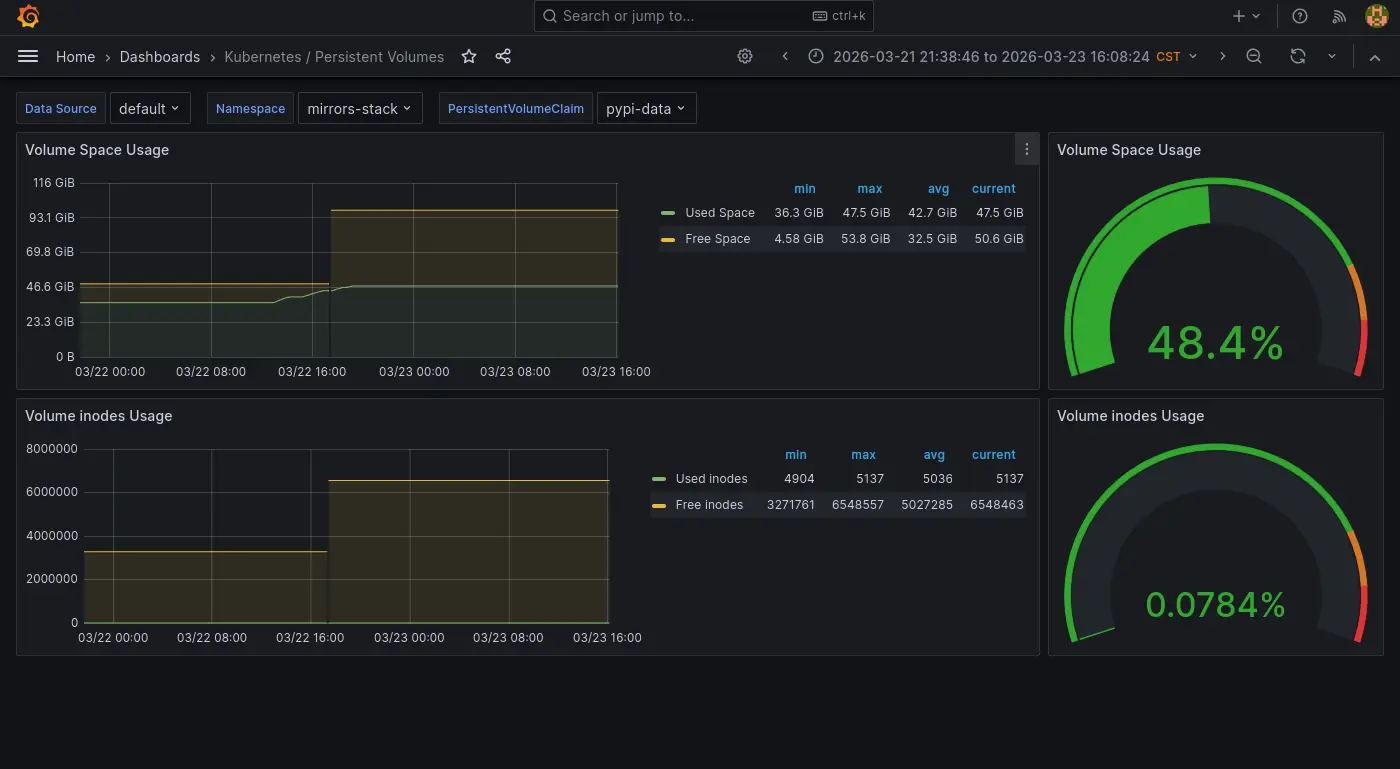
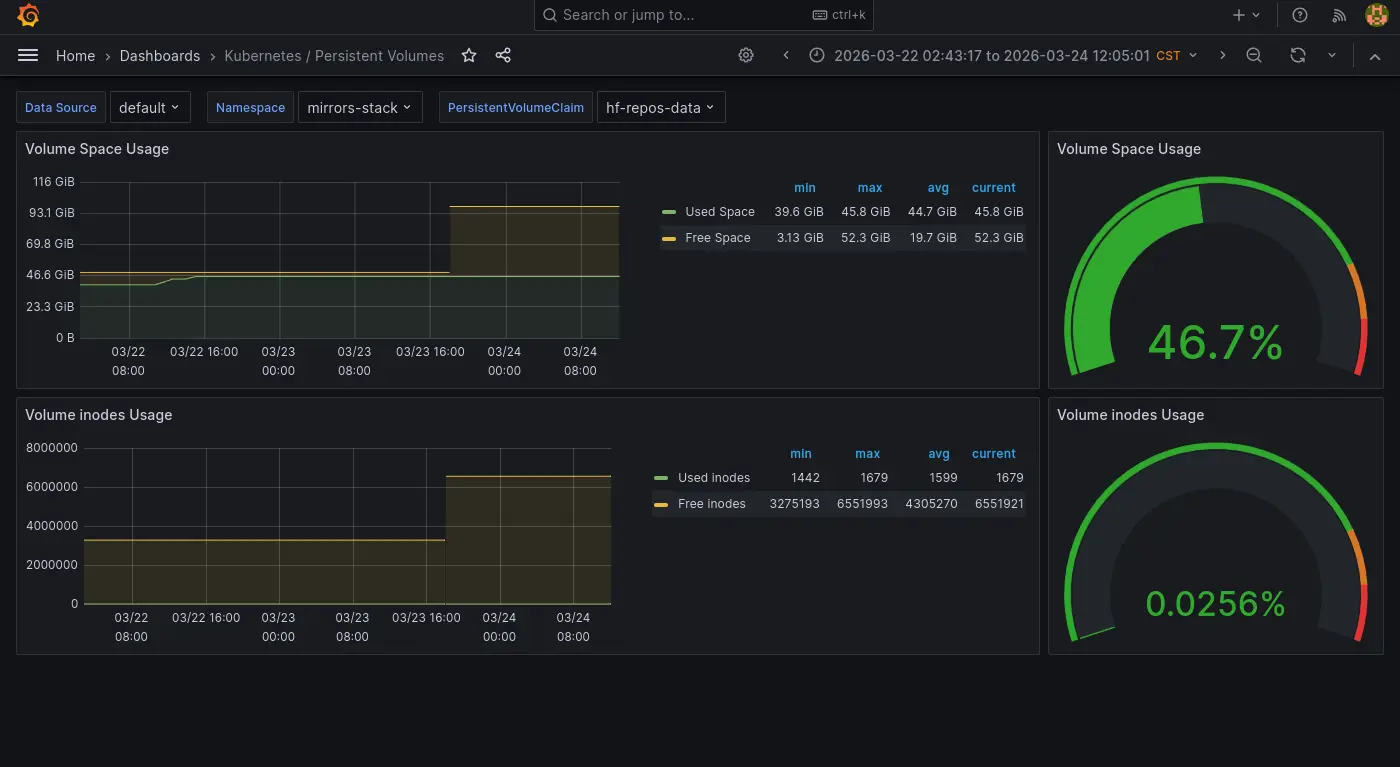
「儲存後端」在 K8s 的正確術語為 Storage Provider 或是理解成 CSI(Container Storage Interface) 實作,我稱為儲存後端只是為了通俗理解與方便不熟的讀者閱讀。
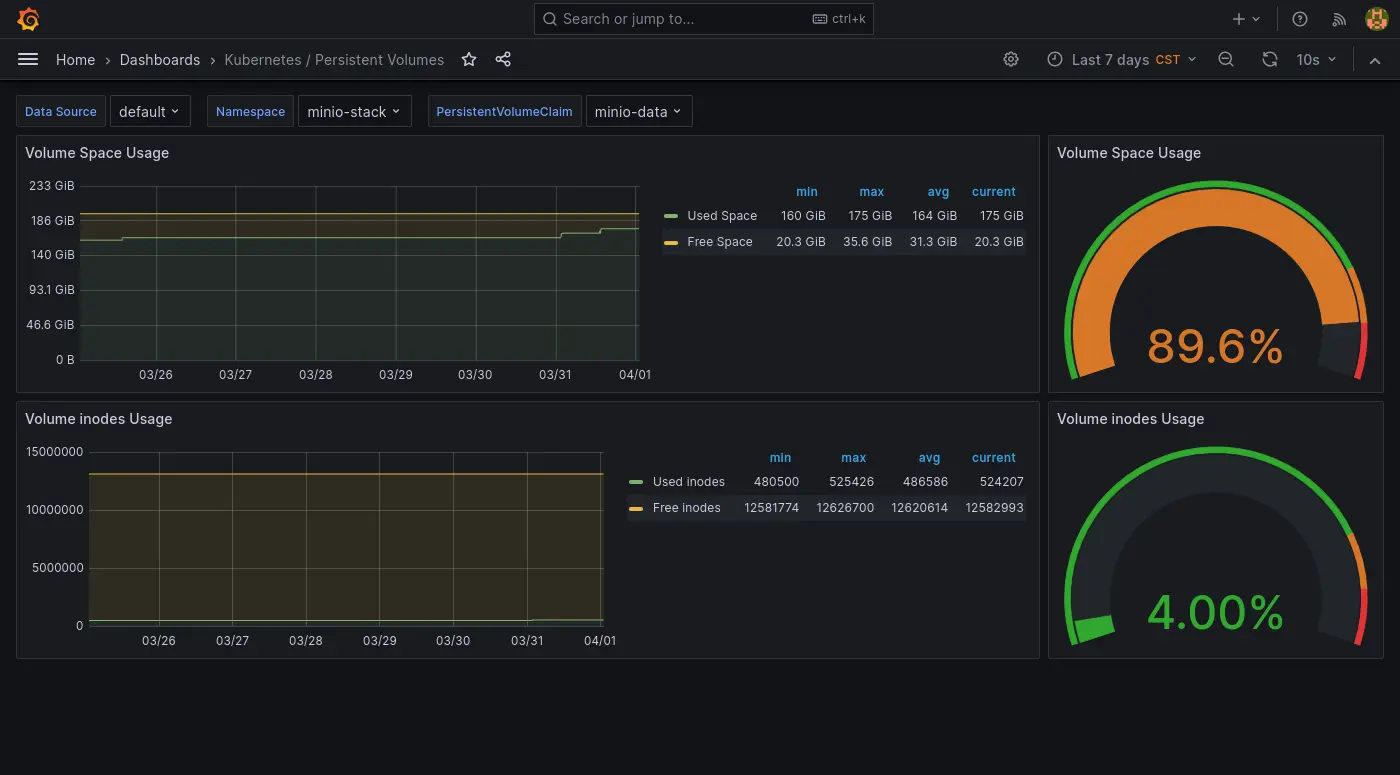
最近則是 S3 實例 (MinIO) 快滿了,想說這次擴展的時候順便寫個筆記紀錄一下。
調整大小
apiVersion: v1
kind: PersistentVolumeClaim
metadata:
  labels:
    io.kompose.service: minio-data
  name: minio-data
spec:
  accessModes:
    - ReadWriteOnce
  resources:
    requests:
      storage: 250Gi
kubectl apply -k .
然後...就可以了...
配額已達上限
算是小插曲,原本想從 200Gi 翻成兩倍的,但是看來總配額已經滿了:
kubectl apply -k .
service/minio-service unchanged
statefulset.apps/minio unchanged
ingress.networking.k8s.io/minio unchanged
Error from server (Forbidden): error when applying patch:
{"metadata":{"annotations":{"kubectl.kubernetes.io/last-applied-configuration":"{\"apiVersion\":\"v1\",\"kind\":\"PersistentVolumeClaim\",\"metadata\":{\"annotations\":{},\"labels\":{\"io.kompose.service\":\"minio-data\"},\"name\":\"minio-data\",\"namespace\":\"minio-stack\"},\"spec\":{\"accessModes\":[\"ReadWriteOnce\"],\"resources\":{\"requests\":{\"storage\":\"400Gi\"}}}}\n"}},"spec":{"resources":{"requests":{"storage":"400Gi"}}}}
to:
Resource: "/v1, Resource=persistentvolumeclaims", GroupVersionKind: "/v1, Kind=PersistentVolumeClaim"
Name: "minio-data", Namespace: "minio-stack"
for: ".": error when patching ".": admission webhook "validator.longhorn.io" denied the request: error while CheckReplicasSizeExpansion for volume pvc-2fad0e19-2f42-4dd2-8dc7-4e705f227432: cannot schedule 214748364800 more bytes to disk b08f46da-f50f-481d-8eff-de1e605e7859 with &{DiskUUID:b08f46da-f50f-481d-8eff-de1e605e7859 StorageAvailable:1702363136000 StorageMaximum:3936770629632 StorageReserved:214748364800 StorageScheduled:3625277456384 OverProvisioningPercentage:100 MinimalAvailablePercentage:25}
故障排除
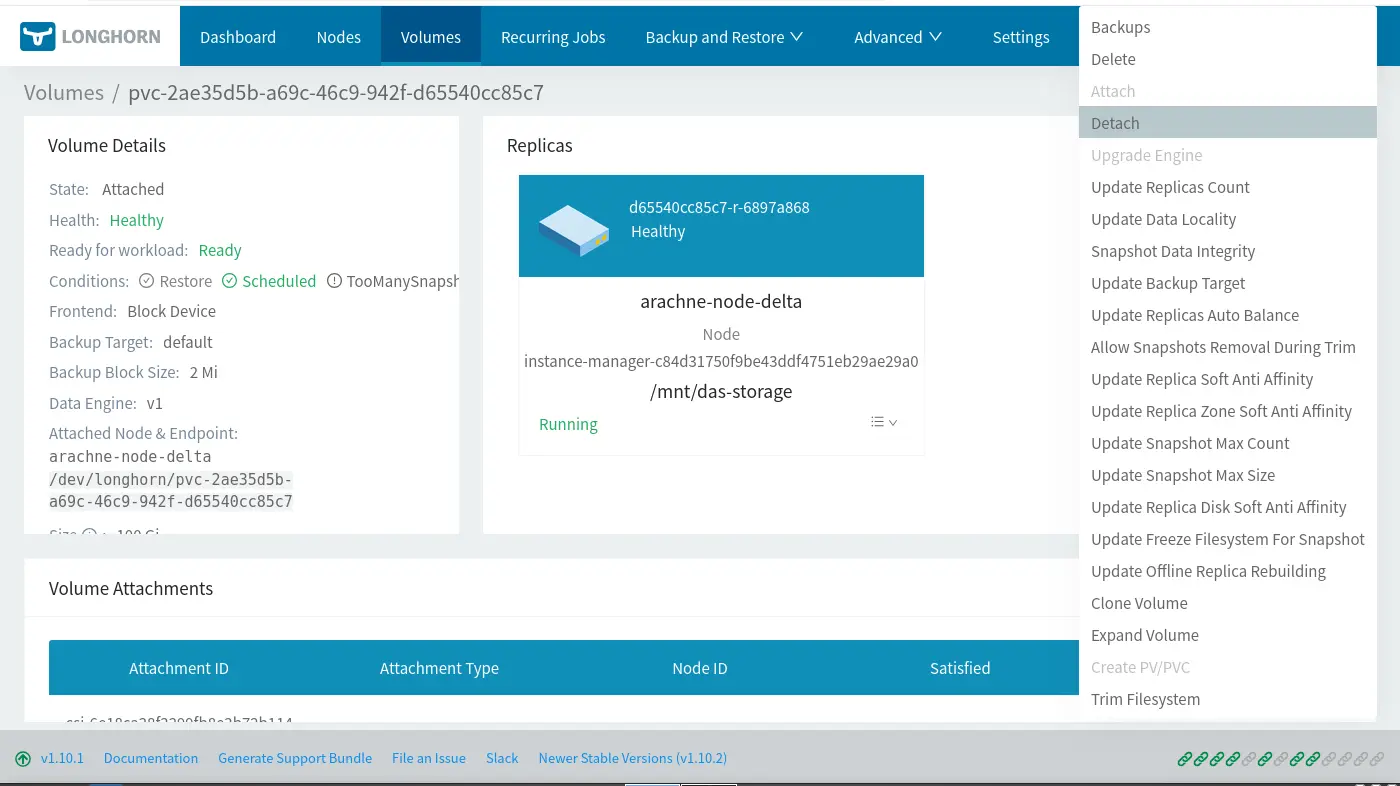
這次過程蠻順利的,但是之前擴展的時候其實遇過 PVC 改大小是卡住的,但是那個時候沒截圖。故障排除的方式是需要把有使用 PVC 的 Pod (StatefulSet) 暫時移除並且 Detach PVC1:
後記
順便補一下一些跟 PVC 有關的東西。
PV 持久化設定
PV (Persistent Volume) 有一個叫做 reclaimPolicy 的設定,如果沒有設定為 Retain 的話 (預設值為 Delete),在 PVC 資源移除時對應的 PV 會被系統自動清除。
更新系統層級的設計,日後新的 PVC 會遵守該設定2:
kubectl -n longhorn-system edit configmaps longhorn-storageclass
# 找到 `reclaimPolicy` 欄位設定成 `Retain`
若要更新已經建立的 PV,則使用以下指令:
for pv in $(kubectl get pv -o jsonpath='{.items[*].metadata.name}'); do kubectl patch pv "$pv" -p '{"spec":{"persistentVolumeReclaimPolicy":"Retain"}}'; done
PVC Dashboard
平常是使用 Prometheus Helm 內建的 Grafana Dashboard (Kubernetes/Persistent Volumes),雖然可以單獨檢查 PVC 但是缺乏快速對所有 PVC 有一個總覽可以快速掌握的功能。於是我安裝了另外一個 Dashboard 來做這件事:
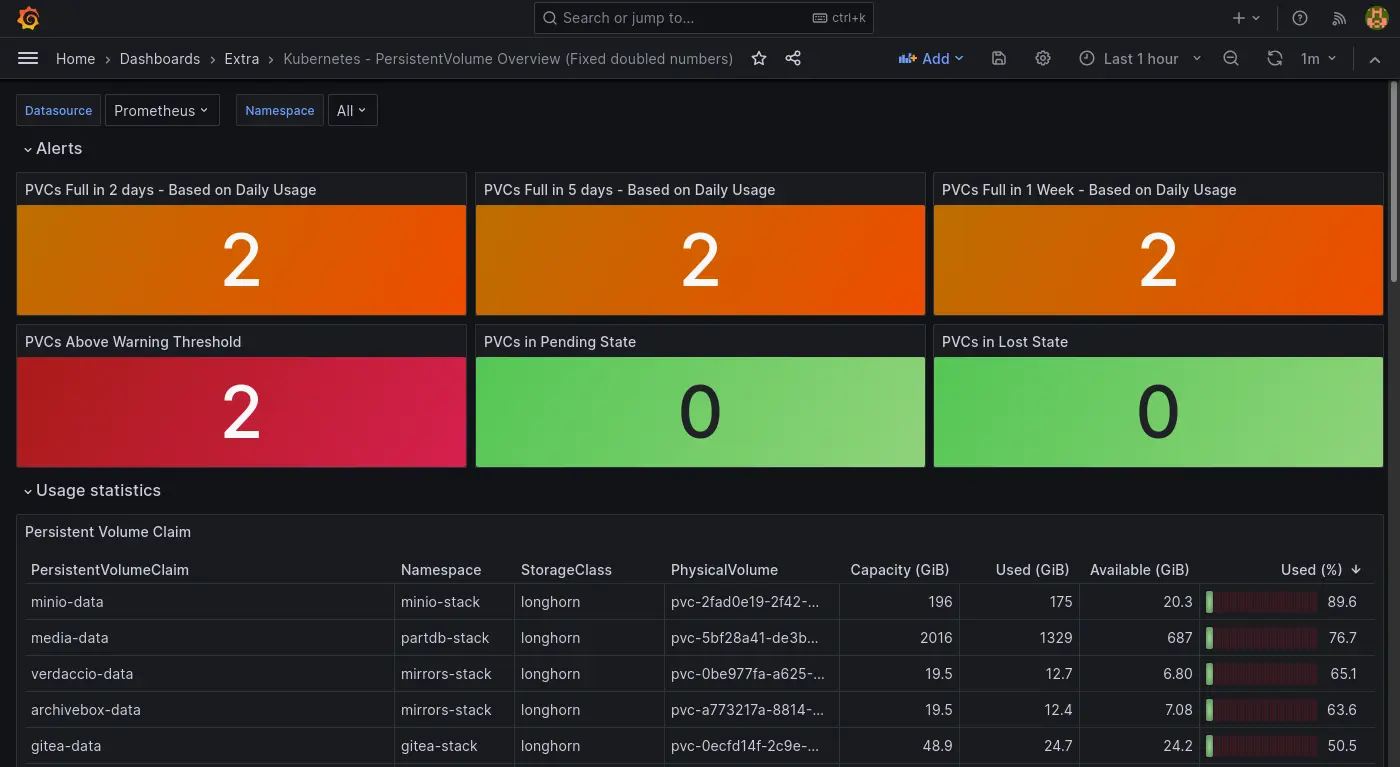
只是不知道為什麼有一點瑕疵:
- 其中一個 PVC 的數字異常。
- 使用百分比的進度條顯示異常。
只是目前暫時懶得故障排除。
Footnotes
-
How can I resize the longhorn volume? The new size should be shown in both rancher&longhorn UI · Issue #2263 · longhorn/longhorn. Retrieved 2026-04-01 from https://github.com/longhorn/longhorn/issues/2263#issuecomment-935739738 ↩
-
How to change reclaimPolicy without reinstalling everything? · longhorn/longhorn · Discussion #10102. Retrieved 2026-04-01 from https://github.com/longhorn/longhorn/discussions/10102#discussioncomment-14380415 ↩